

Your First Session
Build your first structures, follow mentor tasks, complete Portal missions, and collect rewards with this illustrated beginner walkthrough.
Get your base running, complete your first Portal mission, and learn where to collect rewards. Follow the mentor's highlighted tasks at your own pace.
Before you start
Enter a world and open your base. This guide follows a new commander's beginner tasks. If you have already completed some, continue from your current task. The screenshots use the English interface.
Coming from classic browser strategy? Read our OGame alternative overview to see how Galaxy fleets and the Portal Network work together.
Your starting shields protect your planet and Portal for a limited time. Attacking other players can remove the relevant protection. Read confirmation dialogs before taking a hostile action.
1. Open Tasks and follow the highlighted objective
Select Tasks in the base view. The beginner guide starts with the Command Center, then the Portal, then a Portal mission. Use the task's action to find the next building or screen. Return to Tasks and claim each completed task before moving on.
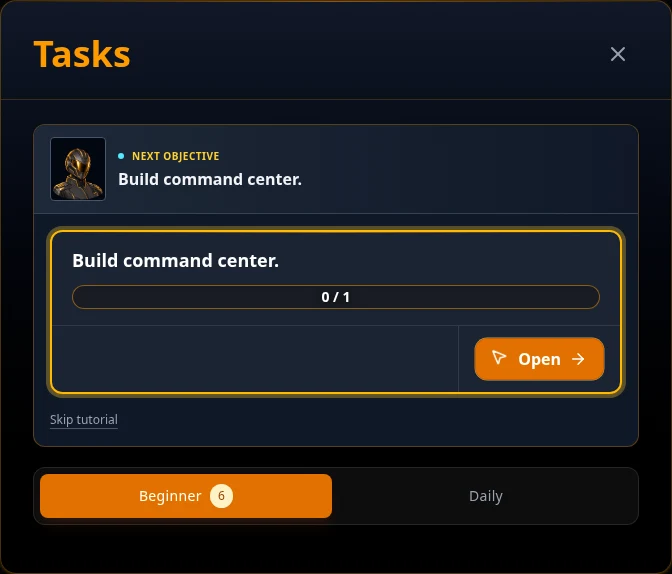
2. Build your Command Center and Portal
On the base, select the Command Center plot and open its construction action. Review the resources and time required, then start construction. A countdown means the work is underway. When it finishes, claim the Command Center task.
Follow the next task to build the Portal, then claim that task too. Its first beginner reward includes an Instant Portal Mission item. Keep following the mentor rather than spending your starting resources on unrelated upgrades.
If a building action is unavailable, check the requirements shown in its menu. Construction needs enough resources and an available building queue.
3. Complete your first Portal mission
Open Portal and select an open mission under Galactic Missions. The unit form opens directly; check the recommended influence and expiration countdown, then choose your ground units. During the beginner guide, use Instant Resolve. This resolves the mission immediately, including any combat.
Follow the first Portal mission walkthrough for screenshots and help choosing units. Return to Tasks afterward and claim the mission task reward.
4. Repeat at level 2, then check Reports
The next beginner objectives are Command Center level 2, Portal level 2, and another Portal mission. Upgrade and claim in that order, following the highlighted task.
After those objectives, follow the mentor to Reports. Read the mission result and use Read and Claim All to collect available report rewards. Task rewards and report rewards are collected separately. Then open Command Help when the mentor points you there.
5. Choose your next upgrade
Look at your Food, Steel, and Energy counters, then compare them with the cost of your next building, research, or training action. Develop the production building for the resource you need: Hydroponic Farm for Food, Steel Foundry for Steel, or Energy Plant for Energy.
The Command Center limits other building levels. Upgrade it when it blocks your next goal. Build a Barracks and train Rangers when you need more ground units for missions. Start research when you have the required lab and resources.
Before logging out, check your queues and report rewards. Timed actions continue while you are away.
How to know you are ready to continue
- Your Command Center and Portal are level 2, and the first six beginner tasks are claimed.
- You have completed Portal missions and know how to read their reports and collect rewards.
- You can identify the resource or requirement blocking your next upgrade.
If you get stuck
- Nothing new is highlighted: reopen Tasks and check whether a completed task still needs claiming.
- Units are unavailable: check whether they are training, injured, or away on an operation. Wait for their return or train replacements.
- Rewards seem missing: check both Tasks and Reports. Completing an action and collecting its rewards are separate steps.
What to try next
Keep the Portal mission guide nearby. Read about resources, buildings, and joining an alliance as you need them.


