

Create an Ephoran Vault
Deploy your alliance's Ephoran Vault, understand its territory bonuses, choose a valid location, and prepare its cooperative event.
Topics covered: Create an Ephoran Vault: Alliance Leadership Guide | Interstellar Empires
An Ephoran Vault is your alliance's shared map hub. Deploying it establishes territory; activating it later opens a cooperative damage-scoring event. This walkthrough is for Owners and Generals.
What a deployed vault means
Your alliance can have one deployed Ephoran Vault. It projects territory even when no vault combat event is running. The starting territory covers 7 by 7 map cells, centered on the vault, and Territory Size alliance research expands it.
Allied troops fighting inside their own territory gain 10% attack and 10% defense. This makes the area a useful place to gather your members. Territory is a combat advantage, not immunity from attack. The Ephoran Vault is also separate from the Secure Vault building on your base.
1. Check your role and alliance
You must be the Owner or a General to deploy, remove, or activate the vault. An Officer or Member can participate in the event but cannot place its hub. If you joined an NPC faction, use its existing vault and scheduled events.
If you are founding a player alliance, build an Alliance Embassy and create the alliance first. Then discuss a gathering location with your members. You do not have to build your own alliance to learn vault events.
2. Choose a gathering location
Open the Galaxy Map and choose a free coordinate with room for members to settle nearby. Prefer a location your group can reach and use regularly. Check surrounding Trading Stations, other vaults, and the Galactic Nexus before deciding.
Vault placement needs more clearance than a single empty cell. The map checks room for the largest possible territory expansion around protected landmarks and other vaults. A visually empty coordinate can still be an invalid vault site.
3. Build the Ephoran Vault
Select the empty coordinate and choose Build Vault. This is a deployment action, so settle on the coordinate before selecting it. It creates the alliance structure at that location.
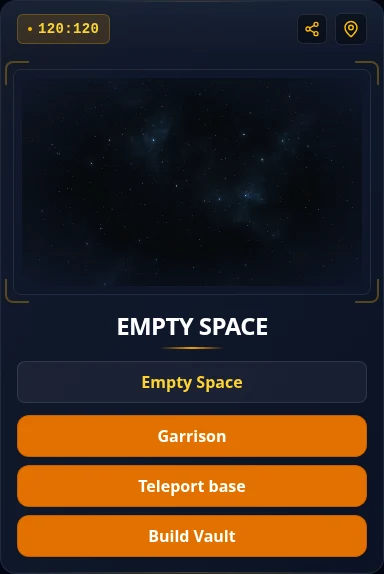
Check that the vault appears with your alliance tag and territory. Share its coordinates in alliance chat or an announcement so members can move nearby. Deployment alone does not start the combat event.
4. Arrange an event before activating it
Agree on a time when members can bring fleets. The event lasts 30 minutes once activated, so members should be ready before you start it. Plan rally leaders, supporting fleets, and enough time for preparation and travel.
When ready, select your deployed vault and use its start action. Owners and Generals can activate it when the alliance's event cooldown allows. The cooldown is 46 hours from the alliance's event start. Continue with Your First Vault Event for participation steps.
If placement is unavailable
- Wrong role: ask the Owner or a General to deploy the vault.
- A vault already exists: find it through your alliance page instead of trying to place another.
- Placement rejected: choose a different empty coordinate farther from nearby vaults, Trading Stations, or the Nexus.
- Relocation cooldown: removing a vault starts a 1-hour wait before another can be deployed. Plan a move with the alliance first.
You are ready when your vault and territory appear on the map and members know where to gather. See the vault reference for event mechanics and the full damage reward table.

